> For the complete documentation index, see [llms.txt](https://docs.nebra.one/llms.txt). Markdown versions of documentation pages are available by appending `.md` to page URLs; this page is available as [Markdown](https://docs.nebra.one/introduction/how-it-works.md).
# How it works
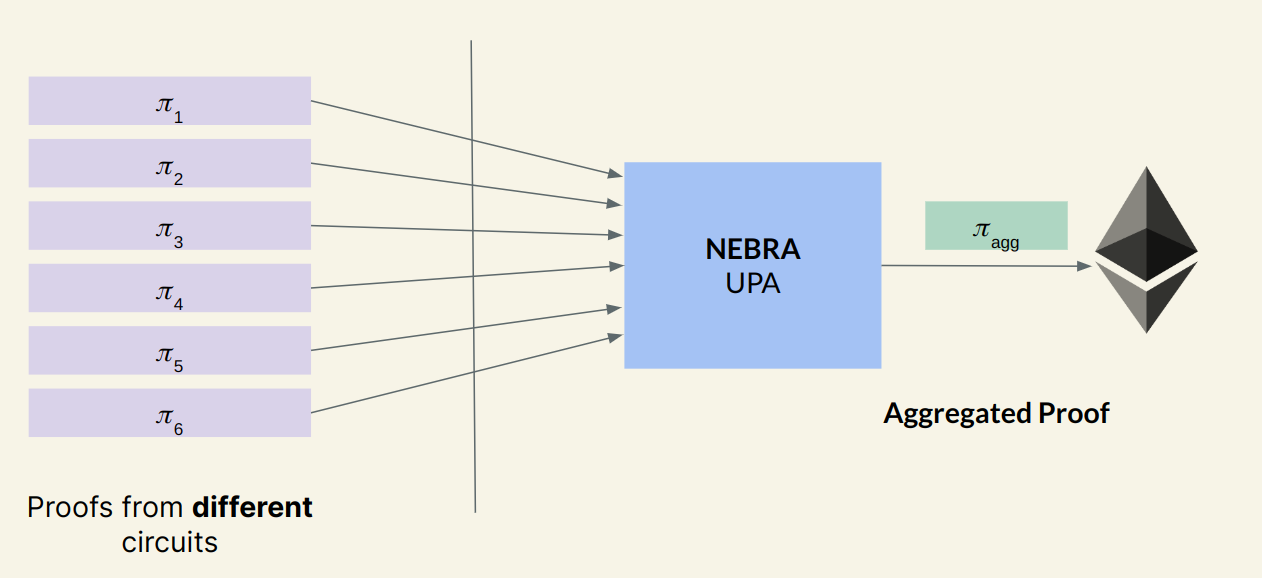
NEBRA UPA v1 (currently v1.2) aggregates `Groth16` proofs (more proof systems to be supported in 2.0) from different sources. After a certain number of proofs (our current batch size is `32`) from different parties have been submitted to our address (see [Deployments](/developer-guide/deployments.md)), our off-chain prover network will generate an aggregated proof $$\pi\_{agg}$$. This aggregated proof effectively states that all the proofs in this batch have been verified. By only verifying aggregated proofs on-chain, the verification cost of each proof is amortized, bringing up to 10x gas savings (see [Gas costs on L1s](/developer-guide/gas-costs-on-l1s.md) for details).
NEBRA Overview
The workflow of a blockchain application powered by zero-knowledge proof using NEBRA is as follows:
1. Register your verification key with NEBRA UPA. This will give you a `circuitId` (see [Registering applications](/developer-guide/registering-applications.md))
2. Submit your proof to NEBRA UPA together with the public input associated with the proof
3. Wait for the event indicating that the proof is verified. After this event, application can query `isVerified` function to execute the application logic
4. Verified (or rejected) proofs can be viewed at NEBRA proof explorer: [nebrascan.io](https://docs.nebra.one/introduction/www.nebrascan.io)